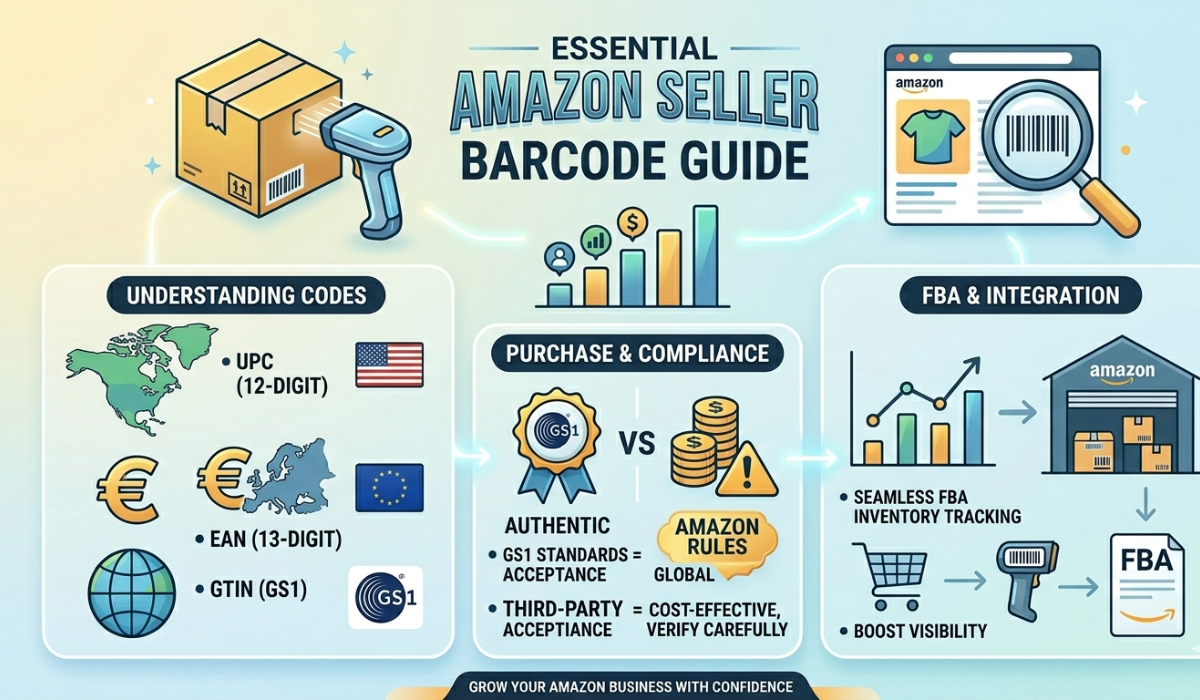
Implementing a barcode system for inventory can transform your business operations. It enhances accuracy and efficiency in managing stock. Barcodes are simple yet powerful tools. They reduce human error and streamline processes. This guide will walk you through setting up a barcode system. It's designed for small businesses and inventory managers.
You'll learn how to choose the right equipment and software. We'll cover everything from barcode types to printing options. Understanding the benefits of a barcode system is crucial. It can lead to significant cost savings and improved customer satisfaction. Training staff is also essential for successful implementation. Proper training ensures smooth operations and maximizes system benefits.
By the end, you'll be ready to implement a barcode system. Start improving your inventory management today.
What Is a Barcode System and Why Use It for Inventory?
A barcode system consists of interconnected tools that work together. These include GS1 barcode labels, scanners, and inventory software. Each part plays a crucial role in managing stock.
Barcodes are visual patterns read by devices. They encode data about products, such as price and stock levels. This data is vital for real-time inventory management.
Using barcodes for inventory provides many benefits. It ensures accuracy and reduces manual input errors. This leads to better decision-making and streamlined operations.
A list of benefits includes:
- Reduced human errors in stock management
- Quick and accurate stock audits
- Improved supply chain visibility
A barcode system is suitable for all business sizes. Small businesses can see significant changes in efficiency. It allows them to compete with larger companies.
Integrating barcodes into existing systems enhances functionality. It improves the tracking and movement of products. Additionally, it can simplify employee tasks and reduce workload.
Step-by-Step Guide: How to Implement a Barcode System for Inventory
Embarking on the journey to implement a barcode system requires careful planning and execution. Below is a detailed guide to streamline the process.
Follow these steps to enhance your inventory management using barcodes. Each stage is crucial to a seamless transition from manual to automated tracking.
1. Assess Your Inventory and Business Needs
Begin by evaluating your current inventory management processes. Understand the specific requirements of your business. Identify areas where barcoding can offer improvements.
Consider the types and volume of products you manage. This will influence the barcode choices you make. Review your operational goals to align them with barcode system benefits.
Key assessment factors:
- Inventory volume and complexity
- Current process limitations
- Business objectives for improvement
Ensure your assessment considers all stakeholders. Comprehensive evaluation sets the foundation for successful implementation.
2. Choose the Right Barcode Types and Formats
Selecting suitable barcode types is essential for effective implementation. Your choice should reflect the data you need to encode. Evaluate the attributes and storage capacity of 1D and 2D barcodes.
Determine the level of detail required in your barcodes. This affects whether to use linear or matrix formats. Each has unique advantages suited to different applications.
Considerations for choosing barcodes:
- Data encoding requirements
- Environmental factors for durability
- Integration with existing systems
Make your selection based on thorough research and anticipated future needs. This ensures longevity and flexibility in your solution.
3. Select Barcode System Hardware and Software
Hardware and software are the backbone of any barcode system. Choose scanners and printers that align with your operational demands. Evaluate mobile options for added flexibility.
Ensure the software integrates seamlessly with existing systems. Consider features like real-time data tracking for enhanced inventory visibility. Cloud-based solutions offer additional benefits.
Considerations for equipment and software:
- Compatibility with inventory needs
- Ease of integration and use
- Future scalability options
A well-chosen combination accelerates the implementation process. Evaluate multiple options to ensure compatibility with business processes.
4. Create and Assign Barcodes to Inventory Items
Buy barcodes for every inventory item. Utilize gs1upc.net software tools to automate this task efficiently. Assigning unique barcodes ensures prices tracking and management.
Establish a systematic approach to manage barcodes. Consistency is key for integration with other business systems. This simplifies tracking and audit processes.
Steps in barcode creation:
- Define data elements for each item
- Use software for bulk generation
- Maintain a record of assigned barcodes
Successful barcode assignment enhances efficiency and tracking accuracy. Adopt best practices for consistent results across the board.
5. Print and Apply Barcode Labels
With barcodes ready, focus on printing them accurately. Choose high-quality labels suitable for your environment. Ensure legibility to prevent scanning errors.
Apply labels to inventory items carefully. Placement should facilitate easy scanning. Consistent application minimizes human errors during operations.
Steps for label handling:
- Select durable label materials
- Ensure print clarity
- Consistent label placement
Quality printing and application foster operational efficiency. Regular checks ensure continued effectiveness and accuracy.
6. Integrate Barcodes with Your Inventory Management System
Integration is crucial for leveraging barcode benefits. Link barcodes with existing inventory management systems for real-time data processing. This enhances visibility and control over stock.
Ensure seamless data flow between barcoding and inventory systems. Automation minimizes manual interventions, reducing errors. Choose systems that support your business objectives.
Integration steps include:
- Establish data connection protocols
- Test systems for seamless operation
- Monitor data accuracy and flow
Effective integration enhances decision-making. Ensure your systems communicate well for a cohesive operation.
7. Train Staff and Test the Barcode System
Training is vital in ensuring smooth system adoption. Educate staff on barcode handling and device operation. Comprehensive training minimizes resistance and errors.
Conduct system testing before full deployment. Address any issues to prevent operational disruptions. Thorough testing strengthens system reliability.
Training and testing tasks:
- Schedule hands-on training sessions
- Perform comprehensive system checks
- Collect feedback for improvements
Prepared staff are key to system success. Regular training and feedback keep the system functioning efficiently.
8. Go Live and Monitor Performance
Launch the barcode system once testing is complete. Ensure all components are ready for operational use. Begin monitoring performance from day one.
Collect data to evaluate system effectiveness. Make adjustments based on initial performance metrics. Continuous monitoring ensures long-term success.
Key steps in going live:
- Confirm system readiness
- Monitor initial performance
- Adjust based on feedback
Proactive management post-launch ensures sustained efficiency. Regular reviews and adaptations maintain optimal performance.
Best Practices for Using Barcodes in Inventory Management
Adopting best practices ensures you maximize the benefits of barcodes. Consistent application and strategic integration are essential components. This maintains accuracy and efficiency across all inventory processes.
Regularly update your inventory data. This keeps barcode information precise and relevant, reducing errors in stock management. Accurate data enhances inventory forecasting and decision-making.
Incorporate periodic training sessions. This familiarizes employees with new technologies and updates. Keeping staff informed helps maintain system integrity and efficiency.
Key best practices include:
- Schedule regular system audits
- Use durable materials for labels
- Implement feedback loops for continuous improvement
Adopt mobile technology where feasible. This adds flexibility to inventory operations. Mobile solutions can improve real-time data access, enhancing responsiveness.
Optimal barcode usage requires ongoing effort and adaptation. Regular evaluations and updates ensure the system continues to meet evolving business needs.
Key Benefits of a Barcode Inventory System
Implementing a barcode system for inventory offers many benefits. These advantages translate to improved accuracy and efficiency in operations. Businesses see quick paybacks from the initial investment.
First and foremost, barcode systems cut down on data entry errors. Traditional methods often lead to mistakes. Barcodes minimize human error, ensuring precise inventory tracking.
Next, barcodes save time. Scanning items is much faster compared to manual entry. This speed enhances productivity and optimizes resource allocation.
Inventory management becomes more reliable and predictable. Businesses can easily monitor stock levels in real-time. This leads to better decision-making and fewer stockouts.
Key benefits include:
- Enhanced inventory accuracy
- Time-efficient stock tracking
- Real-time data access
These systems are highly adaptable. They can scale with business growth, accommodating more products and locations. Thus, barcodes are a long-term solution for dynamic business needs.
Understanding Barcode Types: 1D, 2D, and More
Barcodes come in two main categories: 1D and 2D. Each serves different purposes and suits various needs. Understanding these types is crucial for selecting the right one.
1D barcodes, also known as linear barcodes, are straightforward. They represent data using parallel lines. UPC and Code 39 are common examples used in retail.
On the other hand, 2D barcodes are more complex. They can hold more information in a smaller space. QR codes and Data Matrix are popular 2D formats utilized in various industries.
Deciding between 1D and 2D depends on your data needs. For detailed information, 2D is preferable. If minimal data suffices, 1D barcodes will do.
Here are key barcode types:
- 1D barcodes (e.g., UPC, Code 128)
- 2D barcodes (e.g., QR code, Data Matrix)
By evaluating your business requirements, you can choose the best fit. Each type has distinct advantages based on data capacity and application. Always consider future scalability when selecting barcode types.
Common Barcode Formats for Inventory
Choosing the right barcode format is crucial for inventory management. Different formats offer varying data capacities. Each is suited to specific business needs.
UPC is a well-known format. It works well in retail, especially in tracking products. Code 39 is another option, commonly used in industrial settings due to its flexibility.
For higher data requirements, consider 2D formats. QR codes store large amounts of data, useful for tracking detailed inventory information. Data Matrix works well for small items, providing a compact solution.
Popular inventory barcode formats:
- UPC
- Code 39
- QR Code
- Data Matrix
Selecting the correct format ensures efficient inventory operations. Consider factors like data requirements and physical space when choosing a format. The right choice can significantly enhance system performance.
Essential Components of a Barcode System
To implement an effective barcode system for inventory, you need several key components. These elements ensure smooth operation and accuracy in managing stock.
Firstly, barcode hardware is essential. This includes barcode scanners, printers, and sometimes mobile devices. These tools are crucial for reading and generating barcode labels.
Secondly, reliable software is a must. Inventory management systems are needed to process and analyze data collected through barcode scanning. This software provides real-time inventory tracking and insights.
An efficient barcode system also requires quality barcode labels. These labels carry the encoded data that the scanners read. They come in various materials suited to different environments.
Key components of a barcode system include:
- Barcode hardware
- Inventory management software
- Quality barcode labels
Choosing the right components enhances productivity and accuracy. Each part plays a vital role in the overall effectiveness of the system.
Hardware: Scanners, Printers, and Mobile Devices
Hardware forms the backbone of any barcode system. Scanners, printers, and mobile devices are among the most vital tools for successful barcode implementation.
Scanners are essential to read barcodes. They quickly capture data and reduce manual entry errors. You can choose from handheld, stationary, or mobile scanners, depending on your business needs.
Printers are necessary for creating barcode labels. They ensure barcodes are clear and legible. Options vary from thermal to laser printers, each with unique benefits.
Mobile devices serve as an extension of barcode systems. They offer flexibility and enhance the functionality of scanners and printers.
Considerations for barcode hardware include:
- Handheld, stationary, or mobile scanners
- Thermal or laser printers
- Integrated mobile devices
Choosing the right hardware improves efficiency. Evaluate your operational needs to select suitable tools.
Software: Inventory Management Integration
Integrating software into a barcode system is crucial for effective inventory management. The software processes and interprets scanned data, providing valuable insights.
Inventory management software aids in tracking stock levels. It automates tasks, reducing manual input and human error. The result is improved inventory accuracy and visibility.
Your choice of software should integrate seamlessly with your barcode hardware. This ensures real-time data collection and processing. A cloud-based system offers additional benefits, like remote access and data security.
Features to consider in inventory software include:
- Real-time data tracking
- Seamless hardware integration
- Cloud-based options
Select software that aligns with your business goals. Effective integration streamlines operations and supports decision-making processes.
Barcode Labels: Materials and Printing Options
Barcode labels are key to the effective use of barcodes. They convey data that scanners read to track and manage inventory. Choosing the right label is crucial.
Materials for barcode labels vary based on usage. Paper labels are common but not suitable for all environments. Synthetic materials offer durability for harsh conditions.
Printing options for labels include in-house or outsourcing. In-house printing offers control, but professional services ensure high-quality results. Choose based on your volume needs and quality standards.
Considerations for barcode labels include:
- Durable materials for specific environments
- In-house vs. outsourced printing
- High-quality print clarity
Selecting the right labels ensures barcode readability and longevity. Evaluate usage conditions to make informed decisions.
Common Challenges and How to Overcome Them
Implementing a barcode system presents distinct challenges. One common issue is the initial cost of setup. Investing in the right equipment can be daunting for small businesses.
Data entry errors also pose significant challenges. Incorrectly scanned barcodes lead to inventory discrepancies. Implementing double-check systems can minimize these mistakes.
Technical glitches can disrupt operations. Regular system maintenance and updates are crucial. Staying proactive reduces downtime and enhances reliability.
Other challenges include:
- Integrating with existing systems
- Training employees effectively
- Ensuring label durability
To overcome these challenges, consider starting small. Gradually expanding the system allows for smoother integration. Seeking expert advice can also provide invaluable insights. Investing in proper training ensures staff are equipped to handle challenges confidently. A well-planned implementation can transform potential barriers into opportunities for growth.
Cost Considerations and ROI of Barcode Systems
Investing in a barcode system requires an initial financial outlay. This can include purchasing scanners, printers, and labels. Additionally, software licensing fees may apply.
Despite these costs, the long-term savings are significant. Improved inventory accuracy reduces loss and increases efficiency. Faster processing times mean less spent on labor.
When evaluating return on investment (ROI), look beyond immediate expenses. Consider ongoing savings from reduced errors and increased productivity. Think about how streamlined processes can enhance customer satisfaction.
Key cost considerations include:
- Equipment and software expenses
- Training for employees
- Maintenance and support fees
Ultimately, a barcode system is an investment in efficiency. It can lead to improved cash flow and inventory turnover. Businesses that strategically implement these systems often see their ROI improve within the first year. By carefully managing the implementation, companies reap substantial long-term benefits.
Scaling and Upgrading Your Barcode Inventory System
As your business grows, so must your barcode system. Scaling ensures it meets increasing demands and complexity. Expansion might include integrating more advanced software features.
Upgrading involves reassessing your hardware. Older scanners and printers may need replacing as technology evolves. New models are often faster and more reliable.
Here are some steps to consider:
- Evaluate current system performance
- Identify areas needing upgrades
- Consider cloud-based solutions for flexibility
Investing in scalable systems ensures seamless growth. It also aids in supporting new business opportunities without bottlenecks. Keeping your barcode system current can enhance operational efficiency and improve inventory management. Regular assessments and strategic planning will help maintain its effectiveness.
Frequently Asked Questions About Barcode Inventory Systems
What is a barcode system for inventory?
A barcode system uses labels and scanners to manage stock. It helps track items, reducing errors and saving time.
How much does a barcode system cost?
The cost varies depending on your needs. Small systems might be affordable, while larger setups require more investment.
Can I integrate barcodes with my existing software?
Yes, many barcode systems seamlessly integrate with current inventory software, enhancing functionality.
What barcode types should I use?
It depends on data requirements. 1D codes are common, but 2D codes store more information.
Should I hire a professional to implement the system?
Though not necessary, expert advice ensures a smooth setup.
Are barcode systems beneficial for small businesses?
Absolutely. They streamline operations and enhance inventory accuracy, vital for small businesses.
How do barcodes improve inventory management?
They provide real-time tracking and reduce manual errors. This leads to efficient inventory control.
Understanding these FAQs can help you make informed decisions. Barcode systems offer tangible benefits, irrespective of business size or industry.
Conclusion: Taking the Next Steps Toward Efficient Inventory Management
Implementing a barcode system transforms how you manage inventory. It enhances accuracy, reduces errors, and optimizes processes.
It's important to plan thoroughly and train staff to maximize benefits. Use the system to gain insights and improve inventory control continuously.
A barcode system is not just a tool, but a strategic asset. Use it to drive your business forward with more efficient inventory management.